
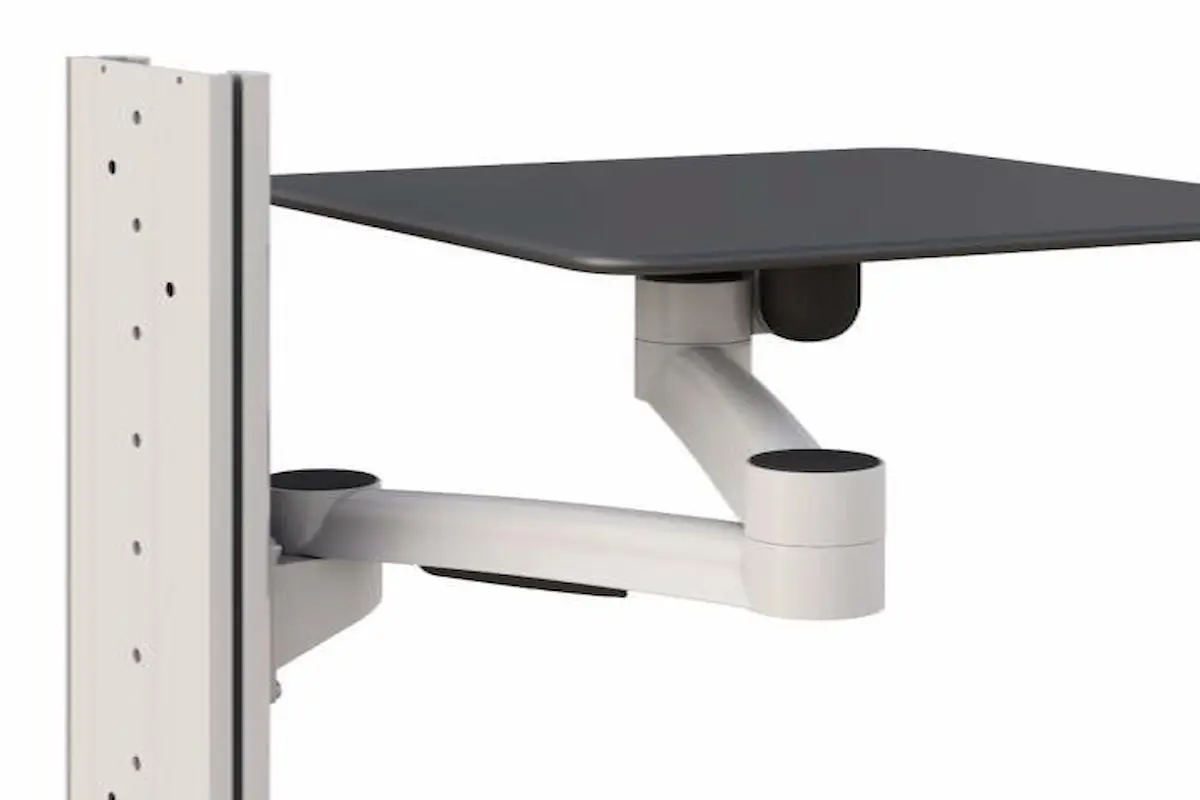
An articulating wall shelf creates an accessible equipment surface without permanently occupying valuable floor or desk space. For teams comparing adjustable mounting solutions, it can bring a device into a comfortable working position and move it closer to the wall when the task ends.
However, the best result depends on more than the shelf size. Buyers must consider the supported equipment, arm reach, rotation, mounting height, wall construction, cable movement, and daily workflow. A poor match can create awkward reach, blocked walkways, unstable positioning, or difficult maintenance access.
This guide explains how articulating shelves work and when they outperform fixed alternatives. It also provides practical planning steps for facility managers, IT teams, healthcare planners, industrial engineers, office managers, installers, and procurement professionals.
What Is an Articulating Wall Shelf?
An articulating wall shelf is a platform attached to a movable arm and wall plate. Its joints let users extend, retract, and rotate the shelf within a defined area. Some models also provide height adjustment, tilt, rotation stops, or position locks.
A simple swing arm wall mount supports short, predictable movement, while a multi-joint design offers more reach and side-to-side control.
Most systems combine a shelf platform, articulated arm, structural wall bracket, and equipment-retention features. Buyers can compare complete wall-mounted systems when they need coordinated supports for screens, keyboards, computers, or other devices.
Common applications include:
- Laptops, compact computers, and docking stations
- Keyboards, mice, scanners, and control devices
- Small medical, diagnostic, or documentation equipment
- Inspection tools, test instruments, and industrial terminals
- AV components, communication devices, and shared peripherals
Unlike a fixed shelf, the platform does not stay in one working position. It also differs from a folding shelf, which usually raises or lowers against the wall instead of moving horizontally through an articulated arm.
When an Adjustable Shelf Is Better Than a Fixed Shelf
An adjustable equipment shelf works best when the ideal equipment position changes during the day. For example, one user may need a device directly in front of a workstation, while another may need the same surface moved aside for access or cleaning.
Choose an Articulating Shelf When Movement Supports the Task
An articulating design may be the better choice when users share equipment, work from different positions, or need temporary access to controls. It also helps when a device must clear a door, cabinet, patient area, production process, or primary work surface after use.
Choose a Fixed Shelf When Stability Is the Main Priority
A fixed shelf may remain the better option when equipment never changes position, requires a large continuous surface, or must resist frequent pushing and pulling. Fixed designs also have fewer moving joints, so they can simplify planning in tight spaces.
Therefore, do not select articulation only because it offers more adjustment. Start with the task. Then choose the simplest mechanism that provides the required access and clearance.
How Articulating Shelves Save Workspace
A space-saving wall shelf uses vertical wall area instead of adding another floor-standing cabinet or desk. When the equipment is not active, users can retract the platform to reduce its projection into the room.
Preserve the Primary Work Surface
Moving secondary equipment off a desk keeps the main surface available for writing, assembly, documentation, or other tools. This approach can be especially useful at compact service counters, clinical work areas, monitoring stations, and technical benches.
Support Shared and Flexible Work Zones
Articulation also lets one device serve more than one nearby position when the movement range allows it. However, the arm should never swing across a busy route or interfere with another user’s work area.
For longer horizontal repositioning, track mounting systems may provide a more structured path than a single pivot point. A track can help organize several components along one wall while keeping adjustment predictable.
Move Supporting Hardware Off the Floor
A shelf works best as part of a complete equipment plan. For desktop computers, compatible CPU holders can keep the computer off the floor and reduce clutter around the active shelf. Cable routing should follow the entire motion path without stretching or pinching.
Actual space savings still depend on the arm’s retracted depth, shelf size, and surrounding clearances.
Movement, Extension and Rotation Explained
Specifications often list extension, rotation, retracted depth, tilt, and load capacity. Each value describes a different part of the usable movement.
Extension and Retracted Depth
Extension measures how far the shelf can move away from the wall. More reach can improve access, but it also increases the movement envelope. Retracted depth shows how far the system projects when stored, which matters in narrow rooms and areas with passing traffic.
Rotation and Joint Configuration
Rotation describes how far the arm or shelf can turn. The movement principles resemble those used by adjustable monitor arms, although shelf systems must also support the platform, equipment footprint, and changing center of gravity.
A single joint creates a simple arc. Multiple joints create a broader range, but they also introduce more possible collision points. Consequently, buyers should review the full path rather than relying only on the maximum extension number.
Map the Motion Before Ordering
Use this quick planning method:
- Measure the working position. Record the wall-to-user distance and the preferred location of the equipment controls.
- Mark the retracted position. Confirm that the shelf will not block outlets, doors, storage, displays, or cleaning access.
- Trace the movement path. Use removable tape to outline the arm and shelf at several positions. Check cables and connectors. Allow enough slack for full movement without pulling, looping into pinch points, or crossing walkways.
Also consider load position. A deep device near the shelf edge creates more leverage than compact equipment near the arm.
Applications in Medical, Industrial and Office Environments
Articulating shelves support different workflows, so the correct features vary by environment. The product should match the task, equipment, cleaning needs, and frequency of adjustment.
Medical and Clinical Work Areas
In examination rooms, laboratories, and treatment areas, an articulating shelf can support documentation devices, compact computers, or selected diagnostic equipment. Users can bring the device closer during a task and retract it when access around the work zone matters.
Medical planners should also review surface materials, exposed joints, cable routing, equipment retention, and compatibility with the facility’s cleaning procedures. In addition, the shelf should not interfere with patient access or staff movement.
Industrial and Technical Workstations
Manufacturing and maintenance teams may use a movable shelf for scanners, HMIs, inspection tools, testing devices, or digital work instructions. In these settings, durability, secure positioning, cable protection, and access while wearing required work gear may influence the selection.
The arm should remain clear of production equipment, guarded areas, and material flow. Furthermore, the mount and shelf should suit the local environment, including any dust, vibration, cleaning, or temperature considerations identified by the manufacturer.
Office, Service and Shared Workspaces
Office and service areas may use an articulating shelf for laptops, docking stations, shared peripherals, visitor check-in equipment, or occasional work surfaces. The ability to retract the equipment can keep counters and collaboration areas less crowded.
Frequent users still need appropriate posture. Place controls within comfortable reach and avoid positions that require twisting or leaning.
How to Plan the Shelf’s Mounting Height
There is no single mounting height that fits every person, device, and task. Instead, plan the height around the primary user posture, the equipment’s controls, the viewing angle, and the shelf’s full movement range.
Start With the Main Task
First, identify whether the user will type, view a screen, scan items, operate controls, or place materials on the platform. A viewing shelf and a hands-on work shelf may require different heights.Next, account for the shelf thickness and equipment height. The wall bracket position does not necessarily equal the final working-surface height.
Test Seated and Standing Positions
When several people will use the shelf, test representative seated and standing positions before installation. A temporary mock-up can reveal whether users can see the display, reach controls, and maintain a neutral posture.
Test both extended and retracted positions because comfort can change across the arm’s range.
Confirm Clearance and Wall Support
Check clearance above counters, furniture, equipment, and floor-level obstacles. Then confirm that the selected bracket location aligns with suitable structural support. When accessibility rules, clinical requirements, or building standards apply, coordinate the final height with the responsible facility or design professional.
Safety and Equipment-Placement Best Practices
Safe performance depends on the shelf, arm, equipment, fasteners, wall structure, and user behavior. Review the manufacturer’s instructions before installation or adjustment.
Stay Within the Rated Load
Add the device, power supplies, adapters, peripherals, trays, and expected shelf contents. Keep the combined load within the published rating.
Control the Equipment Footprint
Keep equipment fully on the platform without blocking ventilation or controls. Use an approved retainer if a device could shift during movement.
Review compatible mounting accessories for cable management, keyboard support, adapters, or equipment retention. Every added component must remain compatible with the system and count toward the total load.
Protect Users and Cables
Keep hands clear of joints and pinch points while moving the arm. Route power and data cables so they cannot snag, stretch, disconnect, or enter a walkway. Users should move the shelf with its intended handle or contact area rather than pulling on the equipment.
Do not use the shelf as a handhold, seat, step, or leaning surface. Inspect fasteners, joints, cables, and stability regularly.
Final Selection Checklist
Before ordering, confirm the footprint, load, reach, retracted depth, rotation path, mounting height, wall structure, cable length, and accessory compatibility.
An articulating wall shelf should improve equipment access without creating a new obstruction. When the arm, wall, and equipment work as one system, the shelf can support a cleaner and more flexible workspace.
For help matching a shelf and mounting system to your equipment and facility, contact a mounting specialist to discuss the application, wall conditions, and movement requirements.
Frequently Asked Questions
What is an articulating wall shelf?
An articulating wall shelf supports equipment on a movable arm, allowing users to extend, rotate, and retract the platform as tasks change.
How much weight can an articulating shelf hold?
Capacity varies by product. Add the equipment, accessories, cables, and adapters, then stay within the manufacturer’s published load rating.
Can you mount an articulating shelf on drywall?
Drywall alone may not provide enough support. Installation usually requires studs, reinforcement, masonry, or an approved anchoring method.
How far should an articulating wall shelf extend?
Choose enough reach to place equipment comfortably without creating collisions. Map the full movement path before selecting an extension length.
What is the best mounting height for an adjustable wall shelf?
Set the height around the primary task, user posture, equipment size, and reach. Test both working and retracted positions before installation.